Sunday, June 20, 2010

Saving Weather Stations to a Shapefile with Python

The National Weather Service offers several XML data feeds related to weather conditions. In this tutorial we will use the list of all national observation stations to create a shapefile of Washington stations with Python.

def createXMLfileFromURL(strURL,strOutFilePath):

#Open url and read
res = urllib2.urlopen(strURL)
data = res.read()

#Write data to file
writer = open(strOutFilePath,'w')
writer.write(data)
writer.close()

if __name__=='__main__':

#Grab the XML feed and write it to a file
noaaIndexXML = '/home/gregcorradini/XMLfeeds/indexNOAAII.xml'
createXMLfileFromURL('http://www.weather.gov/xml/current_obs/index.XML',noaaIndexXML)

#Use ElementTree to walk XML for 'station'
root= (etree.parse(noaaIndexXML)).getroot()
listStations = root.findall('station')

#Findall WA stations in XML document
waStations = [i for i in listStations if i.findall('state')[0].text == 'WA']

#Create a dictionary for each station
dictWa = {}
for i in waStations:
#Notice we are using the lat/lng values to create a geom.Point
dictWa[i.findall('station_id')[0].text] = {'the_geom':geom.Point(float(i.findall('longitude')[0].text),float(i.findall('latitude')[0].text)),'station_id':i.findall('station_id')[0].text,'lat':float(i.findall('latitude')[0].text), 'lng':float(i.findall('longitude')[0].text), 'xml_url': i.findall('xml_url')[0].text}

#Create a schema for weather stations
staSchema = schema.Schema('wa_stations_notemp',[('the_geom',geom.Point,Projection('epsg:4326')),('station_id',str),('lat',float),('lng',float),('xml_url',str)])

#Get a workspace
ws = Directory('/home/gregcorradini/GeoTools/geoscript_wrk/isolines/data/US_shapefiles/')

#Create a stations shapefile with our schema
staLayer = ws.create('wa_stations_notemp',schema=staSchema)

#Create a feature for each station value
counter = 1
for key in dictWa.keys():
staFeature = staLayer.schema.feature(dictWa[key],str(counter))
staLayer.add(staFeature)
counter += counter

Tuesday, June 15, 2010

Merging Shapefiles with JavaScript

GeoScript aims to provide a framework for scripting common data processing tasks with GeoTools and the Java Topology Suite. Much in the same way that scripting languages like Python can leverage the powerful OGR/GDAL libraries, GeoScript offers similar functionality from languages that run on the JVM (currently Groovy, JavaScript, Python, or Scala).

In a recent post on his blog, Darren Cope wrote about merging a directory of shapefiles, a common data processing task. Here I'll demonstrate how to do the same thing with the JavaScript version of GeoScript.

This example uses the workspace and layer modules. I'm working with a directory containing shapefiles of US Census block groups for each state, merging them into a single shapefile for the country.


// import modules
var workspace = require("geoscript/workspace");
var layer = require("geoscript/layer");

// create workspaces from existing directories
var source = new workspace.Directory("path/to/source_dir");
var target = new workspace.Directory("path/to/target_dir");

// iterate through layers in source workspace
var country;
source.names.forEach(function(name) {
// create state layer from existing shapefile
var state = source.get(name);
// create country layer first time through
if (!country) {
country = new layer.Layer({
schema: state.schema.clone({name: "country"})
});
// this creates the new shapefile on disk
target.add(country);
}
// iterate through source features to add each to target
state.features.forEach(function(feature) {
country.add(feature);
});
});


While it is hard to beat the terseness of the ogr2ogr example, the JavaScript version of GeoScript provides syntax that I hope is familiar to a larger population of scripters.

Monday, June 14, 2010

Calculating Convex Hull and Minimum Bounding Circle with Groovy

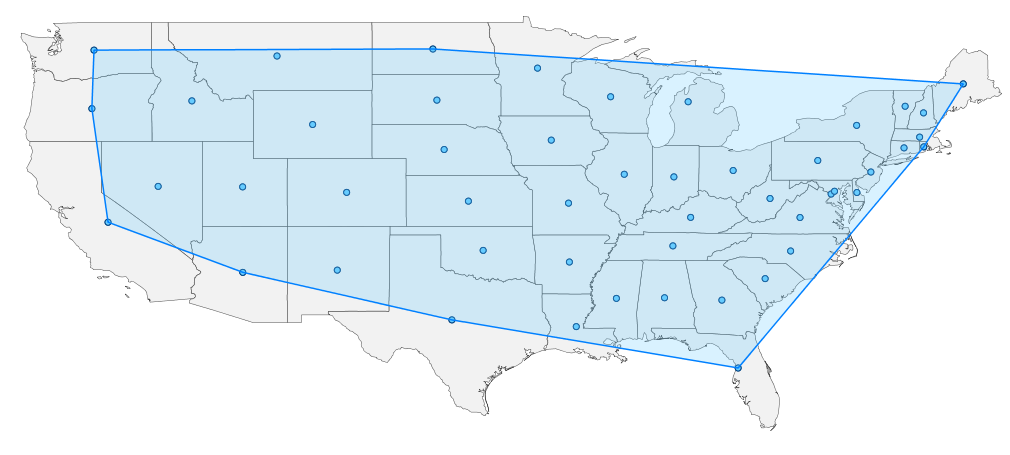
The Java Topology Suite, which Groovy GeoScript wraps, contains spatial operators that act on a group of Features or Geometries. In this post, I collect all geometries from a shapefile to calculate the convex hull and minimum bounding circle. This post builds on previous blog entries where I use GeoScript to extract centroids and buffer Features.

Convex Hull
// Import GeoScript modules
import geoscript.layer.*
import geoscript.feature.*
import geoscript.geom.*

// Get the shapefile
Shapefile shp = new Shapefile('states_centroids.shp');

// Create a new Schema
Schema schema = new Schema('states_convex_hull', [['the_geom','Polygon','EPSG:4326']])

// Create our new Layer
Layer layer = shp.workspace.create(schema)

// Collect the Geometries
List geoms = shp.features.collect{f->f.geom}

// Create a GeometryCollection from the List of Geometries
GeometryCollection geomCol = new GeometryCollection(geoms)

// Get the Convex Hull from the GeometryCollection
Geometry convexHullGeom = geomCol.convexHull

// Add the Convex Hull Geometry as a Feature
layer.add(schema.feature([convexHullGeom]))


Minimum Bounding Circle

// Import GeoScript modules
import geoscript.layer.*
import geoscript.feature.*
import geoscript.geom.*

// Get the Shapefile
Shapefile shp = new Shapefile('states_centroids.shp')

// Create a new Schema
Schema schema = new Schema('states_minimum_bounding_circle', [['the_geom','Polygon','EPSG:4326']])

// Create the new Layer
Layer layer = shp.workspace.create(schema)

// Collect Geometries from the Shapefile
List geoms = shp.features.collect{f->f.geom}

// Create a GeometryCollection from the List of Geometries
GeometryCollection geomCol = new GeometryCollection(geoms)

// Get the Minimum Bounding Circle from the GeometryCollection
Geometry circleGeom = geomCol.minimumBoundingCircle

// Add the Minimum Bounding Circle Geometry as a Feature
layer.add(schema.feature([circleGeom]))

Saturday, June 12, 2010

Buffering Features with GeoScript Python

In a previous post, Jared buffered points and added them to a polygon shapefile. Here's the workflow in Python GeoScript.

from geoscript import proj
from geoscript import geom
from geoscript.layer import Shapefile
from geoscript.feature import schema

def changeGeometryType(strName,geomType,shpParent):

#Get all shapefile schema attributes except 'the_geom'
parentS = [(str(i.name),i.typ) for i in shpParent.schema.fields if not issubclass(i.typ,geom.Geometry)]

#Get shapefile Projection
pPrj = shpParent.schema.get('the_geom').proj

#Reinsert geomType into schema
parentS.insert(0,('the_geom',geomType,pPrj))

#Create centroid buffer schema
centroidSchema = schema.Schema(strName,parentS)

return centroidSchema


if __name__=='__main__':

#Get centroid shapefile
shp = Shapefile('/home/gregcorradini/GeoTools/geoscript_wrk/centroid_buffer/data/centroids.shp')

#Create a geom.Polygon schema from centroid schema
centroidSchema = changeGeometryType('centroid_buffer',geom.Polygon,shp)

#Get shapefile workspace
ws = shp.workspace

#Create a buffered centroid layer based on centroid schema
buffCentLayer = ws.create(schema=centroidSchema)

#For each centroid feature, create a buffered centroid, add it to buffered layer
for f in shp.features():

#Copy all feature attributes into a dictionary
dictFeat = dict(f.iteritems())

#Buffer 'the_geom' 3 degrees
dictFeat['the_geom'] = f.geom.buffer(3)

print dictFeat

#Create a buffered centroid feature with new dictionary attributes
buffFeature = buffCentLayer.schema.feature(dictFeat,f.id)

#Add new feature to buffered layer
buffCentLayer.add(buffFeature)


Calculating Centroids with GeoScript Python

Jared and Tim have shown us how to create centroids from a polygon shapefile in two different GeoScript implementations. Now let's see what the code looks like in Python GeoScript.

from geoscript import proj
from geoscript import geom
from geoscript.layer import Shapefile
from geoscript.feature import schema

def changeGeometryType(strName,geomType,shpParent):

#Put shapefile schema attributes except 'the geom' in a list of tuples
parentS = [(str(i.name),i.typ) for i in shpParent.schema.fields if not issubclass(i.typ,geom.Geometry)]

#Get shapefile Projection
pPrj = shpParent.schema.field('the_geom').proj

#reinsert geomType and proj into schema
parentS.insert(0,('the_geom',geomType,pPrj))

#create centroid schema with the list
centroidSchema = schema.Schema(strName,parentS)

return centroidSchema


if __name__=='__main__':

#Get states shapefile
shp = Shapefile('/home/gregcorradini/GeoTools/geoscript_wrk/centroid_buffer/data/US_shapefiles.shp')

#Substitute geom.Point into schema
centroidSchema = changeGeometryType('centroids',geom.Point,shp)

#Get workspace
ws = shp.workspace

#Create a centroid layer based on centroidSchema
centroidLayer = ws.create(schema=centroidSchema)

#Get all state features
stateFeatures = [f for f in shp.features()]

#For each state polygon get its centroid and add it to our centroid layer
for f in stateFeatures:

#create dictionary to hold each feature's attributes
newAtts = {}

for key in f.attributes.keys():
if issubclass(f.attributes[key].__class__,geom.Geometry):
newAtts[str(key)] = f.geom.centroid
else:
newAtts[str(key)] = f.attributes[key]

print newAtts

#Create a feature based on dictionary
centFeature = centroidLayer.schema.feature(newAtts,f.id)

#Add it to centroid layer
centroidLayer.add(centFeature)


Monday, May 10, 2010

Calculating Centroids with JavaScript


In a previous post, Jared described how to use the Groovy GeoScript to create a new Shapefile based on centroids of features in an existing Shapefile. Today, I'll do the same using the JavaScript implementation.

One significant difference from the other implementations is that there is only one layer type in the JavaScript flavor of GeoScript. To create a layer representing a Shapefile, I'll create a directory workspace and get the layer from that.

In this example, I'll also use the clone methods to create a new layer schema and new features. These clone methods allow for new objects to be created with modified properties. This is useful in creating the schema for the centroids layer, because we want the same fields as the states layer with the exception of the geometry field. In this case, we're creating a layer with point geometries instead of multi-polygon geometries.

Without further ado, here is the code:

// import Directory and Layer constructors
var Directory = require("geoscript/workspace").Directory;
var Layer = require("geoscript/layer").Layer;

// create a directory workspace from an existing directory on disk
var dir = new Directory("data/shapefiles");

// create a layer based on an existing shapefile in the directory
var states = dir.get("states");

// create a new schema with a Point geometry type instead of MultiPolygon
var schema = states.schema.clone({
// give the schema a new name
name: "centroids",
fields: [
// overwrite existing field named "the_geom"
{name: "the_geom", type: "Point", projection: "EPSG:4326"}
]
});

// create a new temporary layer with the new schema
var centroids = new Layer({
schema: schema
});

// add the layer to existing workspace (this creates a new shapefile on disk)
dir.add(centroids);

// iterate through the state features to create features with state centroids
states.features.forEach(function(state) {
var centroid = state.clone({
schema: schema,
values: {
// overwrite the geometry value with the state centroid
the_geom: state.geometry.centroid
}
});
// add the new feature to the layer (this writes to the shapefile)
centroids.add(centroid);
});


The GeoScript viewer module exports a draw method. You can use this to render a layer, or arrays of geometies or features.


// use the viewer module to draw collections of features or geometries
var draw = require("geoscript/viewer").draw;
var geometries = [];

// add all state geometries to the array
states.features.forEach(function(state) {
geometries.push(state.geometry);
});

// add buffered centroids so they will be visible
centroids.features.forEach(function(centroid) {
geometries.push(centroid.geometry.buffer(0.5));
});

// draw all geometries
draw(geometries);


You'll find this example in the examples directory of the repository. See the JavaScript API documentation for more detail on using GeoScript.

Friday, May 7, 2010

Buffering Features with Groovy

In my last post, I calculated centroids from one shapefile and saved them to another using a GeoScript Groovy script. This time I buffer these centroids and save them to a polygon shapefile. Since GeoScript is based on the Java Topology Suite library you can take advantage of any of its geometry operations - intersection, union and difference.
// Import Geoscript modules
import geoscript.layer.*
import geoscript.feature.*
import geoscript.geom.*

// Get the Shapefile we want to buffer
Shapefile shp = new Shapefile('states_centroids.shp')

// Create a new Schema but with Polygon Geometry
Schema schema = shp.schema.changeGeometryType('Polygon','states_buffers')

// Create the new Layer
Layer bufferLayer = shp.workspace.create(schema)

// Specify the buffer distance
double distance = 2 // decimal degrees

// Iterate through each Feature using a closure
shp.features.each{f ->

// Create a Map for the new attributes
Map attributes = [:]

// Set attribute values
f.attributes.each{k,v ->
if (v instanceof Geometry) {
attributes[k] = v.buffer(distance)
}
else {
attributes[k] = v
}
}

// Create a new Feature with the new attributes
Feature feature = schema.feature(attributes, f.id)

// Add it to the buffer Layer
bufferLayer.add(feature)
}

The Layer.getCursor() method, used in the last post, reads one Feature at a time. In this post I use Layer.getFeatures(). This method reads all of the Features in to a list. Here is what you get:

Introducing GeoScript

GeoScript adds geo capabilities to dynamic scripting languages such as JavaScript, Python, Scala and Groovy.