Showing posts with label Groovy. Show all posts

Monday, June 14, 2010

Calculating Convex Hull and Minimum Bounding Circle with Groovy

The Java Topology Suite, which Groovy GeoScript wraps, contains spatial operators that act on a group of Features or Geometries. In this post, I collect all geometries from a shapefile to calculate the convex hull and minimum bounding circle. This post builds on previous blog entries where I use GeoScript to extract centroids and buffer Features.

Convex Hull
// Import GeoScript modules
import geoscript.layer.*
import geoscript.feature.*
import geoscript.geom.*

// Get the shapefile
Shapefile shp = new Shapefile('states_centroids.shp');

// Create a new Schema
Schema schema = new Schema('states_convex_hull', [['the_geom','Polygon','EPSG:4326']])

// Create our new Layer
Layer layer = shp.workspace.create(schema)

// Collect the Geometries
List geoms = shp.features.collect{f->f.geom}

// Create a GeometryCollection from the List of Geometries
GeometryCollection geomCol = new GeometryCollection(geoms)

// Get the Convex Hull from the GeometryCollection
Geometry convexHullGeom = geomCol.convexHull

// Add the Convex Hull Geometry as a Feature
layer.add(schema.feature([convexHullGeom]))
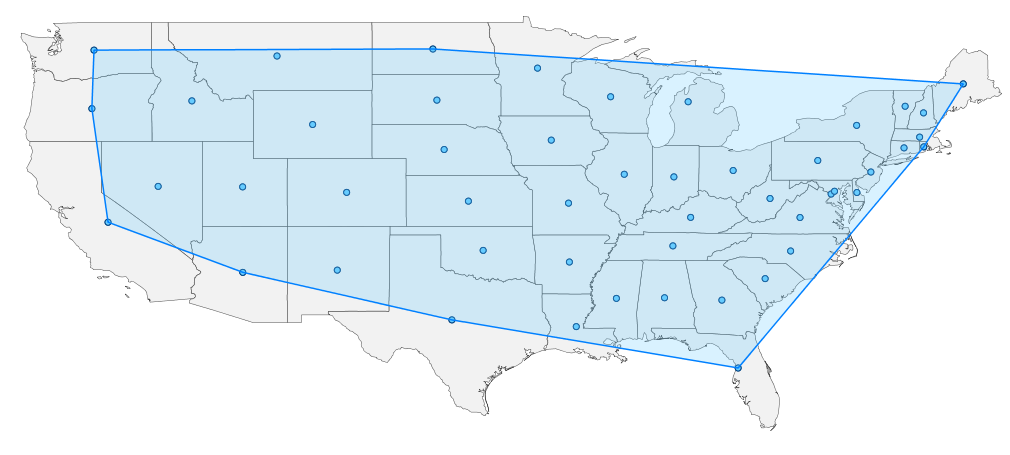


Minimum Bounding Circle

// Import GeoScript modules
import geoscript.layer.*
import geoscript.feature.*
import geoscript.geom.*

// Get the Shapefile
Shapefile shp = new Shapefile('states_centroids.shp')

// Create a new Schema
Schema schema = new Schema('states_minimum_bounding_circle', [['the_geom','Polygon','EPSG:4326']])

// Create the new Layer
Layer layer = shp.workspace.create(schema)

// Collect Geometries from the Shapefile
List geoms = shp.features.collect{f->f.geom}

// Create a GeometryCollection from the List of Geometries
GeometryCollection geomCol = new GeometryCollection(geoms)

// Get the Minimum Bounding Circle from the GeometryCollection
Geometry circleGeom = geomCol.minimumBoundingCircle

// Add the Minimum Bounding Circle Geometry as a Feature
layer.add(schema.feature([circleGeom]))

Friday, May 7, 2010

Buffering Features with Groovy

In my last post, I calculated centroids from one shapefile and saved them to another using a GeoScript Groovy script. This time I buffer these centroids and save them to a polygon shapefile. Since GeoScript is based on the Java Topology Suite library you can take advantage of any of its geometry operations - intersection, union and difference.
// Import Geoscript modules
import geoscript.layer.*
import geoscript.feature.*
import geoscript.geom.*

// Get the Shapefile we want to buffer
Shapefile shp = new Shapefile('states_centroids.shp')

// Create a new Schema but with Polygon Geometry
Schema schema = shp.schema.changeGeometryType('Polygon','states_buffers')

// Create the new Layer
Layer bufferLayer = shp.workspace.create(schema)

// Specify the buffer distance
double distance = 2 // decimal degrees

// Iterate through each Feature using a closure
shp.features.each{f ->

// Create a Map for the new attributes
Map attributes = [:]

// Set attribute values
f.attributes.each{k,v ->
if (v instanceof Geometry) {
attributes[k] = v.buffer(distance)
}
else {
attributes[k] = v
}
}

// Create a new Feature with the new attributes
Feature feature = schema.feature(attributes, f.id)

// Add it to the buffer Layer
bufferLayer.add(feature)
}

The Layer.getCursor() method, used in the last post, reads one Feature at a time. In this post I use Layer.getFeatures(). This method reads all of the Features in to a list. Here is what you get:

Thursday, April 29, 2010

Calculating Centroids with GeoScript Groovy

GeoScript uses the GeoTools and Java Topology Suite libraries to provide easy-to-use scripting APIs with implementations in Python, JavaScript, Scala and Groovy. The GeoScript web site provides simple code snippets in all four languages to help you get started. In this post, I address a real world example: calculating centroids from one GIS layer and saving them to another layer using Groovy. This example highlights the GeoScript Layer, Feature, and Geometry modules.
// import GeoScript modules
import geoscript.layer.*
import geoscript.feature.*
import geoscript.geom.*

// This is the Shapefile we want to extract centroids from
Shapefile shp = new Shapefile('states.shp')

// Create a new Schema (based on the above Shapefile, but with Point Geometry)
Schema schema = shp.schema.changeGeometryType('Point','states_centroids')

// Create the new centroid Layer
Layer centroidLayer = shp.workspace.create(schema)

// Use the Cursor to loop through each Feature in the Shapefile
Cursor cursor = shp.cursor
while(cursor.hasNext()) {

// Get the next Feature
Feature f = cursor.next()

// Create a Map for the new attributes
Map attributes = [:]

// For each attribute in the shapefile
f.attributes.each{k,v ->

// If its Geometry, find the centroid
if (v instanceof Geometry) {
attributes[k] = v.centroid
}
// Else, they stay the same
else {
attributes[k] = v
}
}

// Create a new Feature with the new attributes
Feature feature = schema.feature(attributes, f.id)

// Add it to the centroid Layer
centroidLayer.add(feature)
}

// Always remember to close the cursor
cursor.close()
Here is what you get when you run the script against a shapefile of the 48 contiguous states (sorry Alaska and Hawaii):

Introducing GeoScript

GeoScript adds geo capabilities to dynamic scripting languages such as JavaScript, Python, Scala and Groovy.