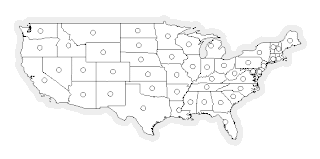
In a
previous post, Jared described how to use the
Groovy GeoScript to create a new Shapefile based on centroids of features in an existing Shapefile. Today, I'll do the same using the
JavaScript implementation.
One significant difference from the other implementations is that there is only one layer type in the JavaScript flavor of GeoScript. To create a layer representing a Shapefile, I'll create a directory workspace and get the layer from that.
In this example, I'll also use the
clone methods to create a new layer schema and new features. These
clone methods allow for new objects to be created with modified properties. This is useful in creating the schema for the centroids layer, because we want the same fields as the states layer with the exception of the geometry field. In this case, we're creating a layer with point geometries instead of multi-polygon geometries.
Without further ado, here is the code:
// import Directory and Layer constructors
var Directory = require("geoscript/workspace").Directory;
var Layer = require("geoscript/layer").Layer;

// create a directory workspace from an existing directory on disk
var dir = new Directory("data/shapefiles");

// create a layer based on an existing shapefile in the directory
var states = dir.get("states");

// create a new schema with a Point geometry type instead of MultiPolygon
var schema = states.schema.clone({
    // give the schema a new name
    name: "centroids",
    fields: [
        // overwrite existing field named "the_geom"
        {name: "the_geom", type: "Point", projection: "EPSG:4326"}
    ]
});

// create a new temporary layer with the new schema
var centroids = new Layer({
    schema: schema
});

// add the layer to existing workspace (this creates a new shapefile on disk)
dir.add(centroids);

// iterate through the state features to create features with state centroids
states.features.forEach(function(state) {
    var centroid = state.clone({
        schema: schema,
        values: {
            // overwrite the geometry value with the state centroid
            the_geom: state.geometry.centroid
        }
    });
    // add the new feature to the layer (this writes to the shapefile)
    centroids.add(centroid);
});
The GeoScript
viewer module exports a
draw method. You can use this to render a layer, or arrays of geometies or features.
// use the viewer module to draw collections of features or geometries
var draw = require("geoscript/viewer").draw;
var geometries = [];

// add all state geometries to the array
states.features.forEach(function(state) {
    geometries.push(state.geometry);
});

// add buffered centroids so they will be visible
centroids.features.forEach(function(centroid) {
    geometries.push(centroid.geometry.buffer(0.5));
});

// draw all geometries
draw(geometries);
You'll find this example in the
examples directory of the repository. See the
JavaScript API documentation for more detail on using GeoScript.

